

Want to personalize your blouse? Give it a touch of originality!
1. Choose your customizable blouse
The embroidery is only done on the heart side and cannot be moved elsewhere on the blouse. You can choose from all the blouses in the Customizable Blouses category.

Orléans - V-neck tunic - Unisex - Dickies

Embroider your blouse according to your wishes in the My Médical workshop

Steph - Tunic - Short sleeves - Unisex - 75 cm
2. Add your custom text
You can embroider one or two lines on the heart side, usually above the top pocket of the blouse. You are free to choose what you want to write on your blouse.
Examples:
Line 1: Justine Dupont
Line 2: Chiropody-Podiatry DE
Line 1: Justine Dupont
Line 2: Name of firm 3
3. Choose your font
You have the option to choose a font for both lines. Here are the 3 possibilities:


4. Choose the color that matches your style
Personalize each line of your blouse by choosing a different color for each one or the same color for both lines.
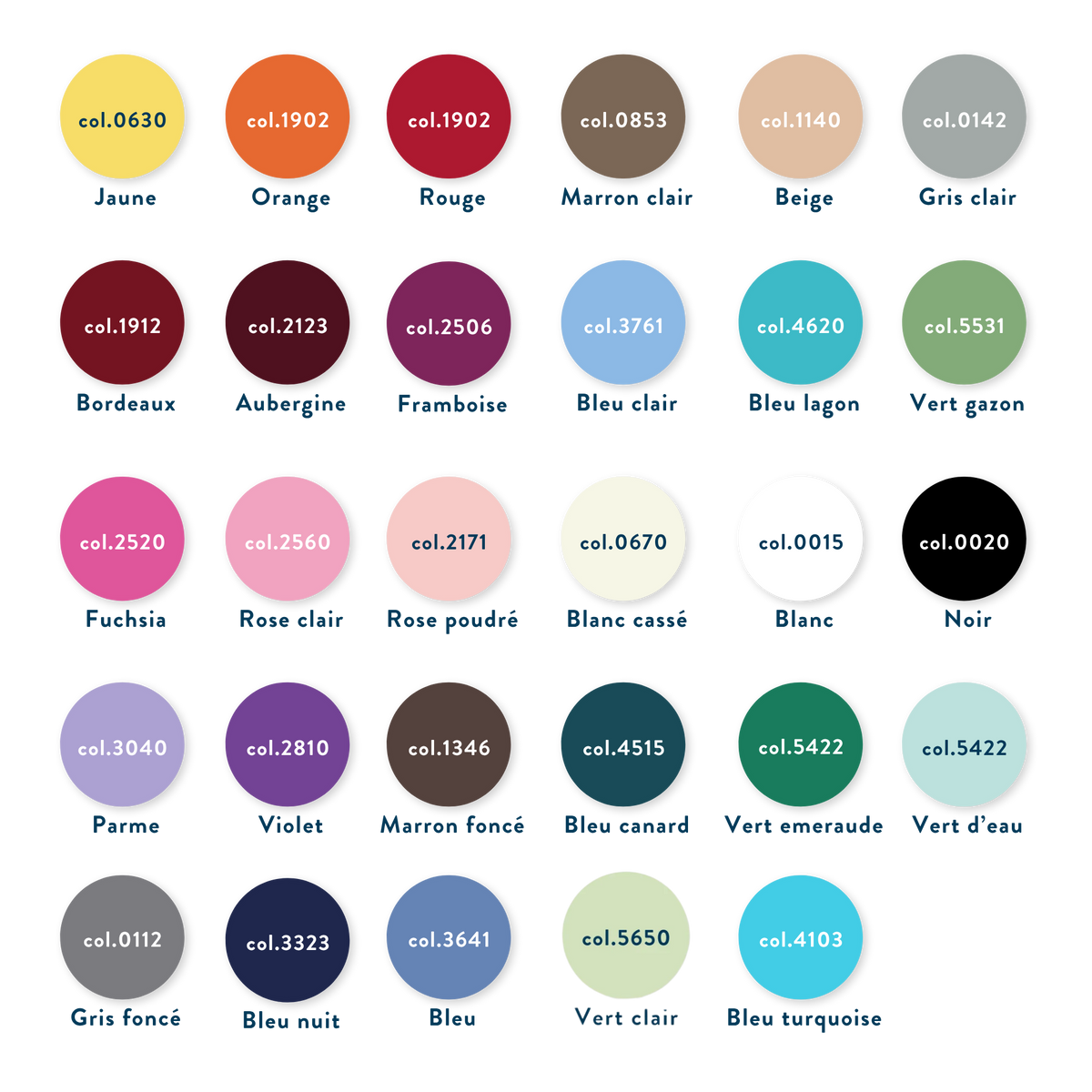
Please select the embroidery color by referring to the color panel available in the photo opposite.
Name color line 1
Lagoon Blue - col. 4620

Name color line 2
Water Green - col. 5050
5. How to submit your embroidery request on our site?
Step 1: Choose your blouse from the Customizable Blouses category and add at least one to your cart.
Step 2: Once the blouse is added to your cart, you can personalize it by clicking here .
Step 3: Make sure you have at least one customizable blouse and the "Embroider your blouse" product in your cart.
Learn more about the steps involved in customizing your blouse:
1. In the "Line 1 Text" field, fill in the text you want to appear on the top line.
2. In the "Row 1 Color" field, fill in the color name or color code you want for the top row.
3. In the "Text line 2" field, fill in the text you want to appear on the bottom line.
4. In the "Row 2 Color" field, fill in the color name or color code you want for the bottom row.
5. Save the customization by clicking the button.
6. Choose whether you want the embroidery on one or two lines. If you want a single line, leave the "Line 2 Text" and "Line 2 Color" fields blank.
7. Choose the font of your choice from the 3 possibilities: Arial, Comic Sans MS or Monotype Corsiva.
8. Add the product to your cart. If you want multiple embroideries, you can repeat the process as many times as you like. You will simply need to add the correct quantity of customizable blouses to your cart.
9. Check the personalization in your cart before ordering.
6. Delivery of personalized blouses
Before embroidering your blouse, we will email you a proof within 24 business hours, with a simulation of your embroidery, including text, colors, and typography. You will need to approve this proof by replying to the email. Changes may be made. Once approved, we will embroider the blouse at our premises in Seignosse.
If the blouse is in stock, you will receive your order within 24 to 48 hours after validation of the proof.
If the blouse is not in stock, you will receive your order within 7 to 14 working days if the proof has been validated.
